Hytale World Gen V2: What It Is & How to Access It Now
Everything you need to know about Hytale World Gen V2 - the new world generation system, how it differs from V1, and how to experience it right now.
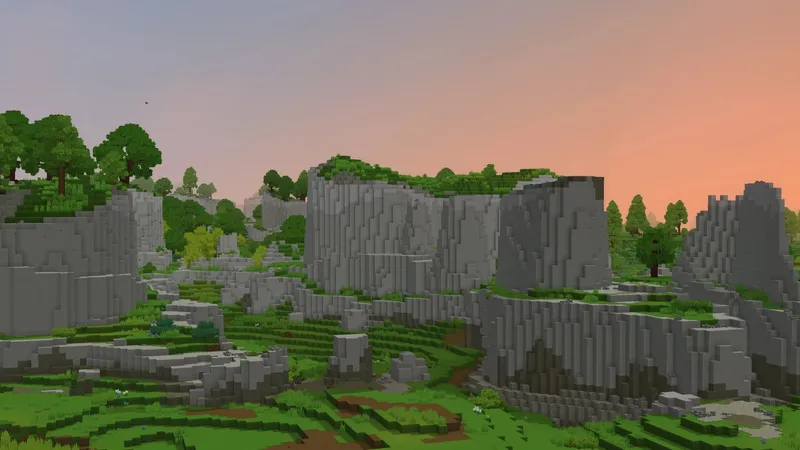
Hytale World Gen V2 is the new world generation system that will eventually replace the current V1 generator. It’s been in development since 2021 and brings major improvements to how Hytale creates its worlds - better terrain, smarter object placement, and powerful modding tools.
The good news? You don’t have to wait. There are already ways to experience V2 content right now.
What’s the Difference Between V1 and V2?
V1 was Hytale’s original world generator, built from 2016 to 2020. It works fine for exploration mode, but the team hit walls when trying to create more complex biomes and zones. V2 was built from the ground up to solve those problems.
Here’s what changed:
| Feature | V1 | V2 |
|---|---|---|
| Development | 2016-2020 (prototype) | 2021-present |
| Designer control | Limited | Full control over procedural content |
| Modding | Basic | Visual Node Editor, no coding required |
| Live editing | No | Yes - changes appear instantly in-game |
| Complex biomes | Hit barriers | Built to handle them |
The biggest shift is philosophy. V2 treats the world as “curated and procedural” - meaning designers (and modders) have granular control over what appears and where, even though generation is still procedural.
Key Features of World Gen V2
Pattern Scanning System
V2 places objects intelligently based on context. A log bridge doesn’t just spawn randomly - it searches for two shores across a river. Glowing mushrooms only appear in sheltered areas. Props understand their environment.
Visual Node Editor
This is huge for modders. You can create and modify biomes without writing a single line of code. The Node Editor treats each biome as a visual graph of connected nodes - terrain shape, materials, objects, environment, and colors.
Every biome in Orbis will eventually be shared with the community, so you can crack them open, see how they work, and remix them into your own creations.
Live Reloading
When you’re editing in the Node Editor, changes appear in-game instantly. No more save-reload-check cycles. You tweak a terrain mask, and it updates right in front of you.
Modding APIs
V2’s architecture lets mod creators build features that automatically integrate with the Node Editor and other mods. Different mods can work together seamlessly instead of conflicting.
How to Experience V2 Right Now
You don’t have to wait for the full V2 rollout. Here are three ways to see it today:
1. Fragments of Orbis (Exploration Mode)
This is the official way to preview V2 content. You’ll need to:
- Find the Forgotten Temple - Open your map after spawning and look for the pinwheel icon
- Unlock the Memory System - Interact with the Heart of Orbis at the temple center
- Collect 100 Memories - Just get near new creatures and NPCs while exploring (no combat required)
- Craft the Ancient Gateway - Unlocks at the Arcanist’s Workbench after 100 Memories
- Craft a Fragment Key - Different keys access different V2 areas
Available Fragments right now:
- Dragonspire Weald - Requires Cobalt Ingot (x10), Essence of Ice (x30)
- The Dread Wade - Requires Adamantite Ingot (x10), Essence of Fire (x30)
- Windrider Valley - Requires Thorium Ingot (x10), Essence of Life (x30)
Note: Fragment visits are time-limited. You’ll auto-return to your world when the timer expires.
2. Creative Hub Portal
As of Update 2, the Creative Hub Portal spawns with V2 flat worldgen. If you’re in Creative mode, you can see V2’s terrain generation without any extra steps.
3. CurseForge Mod
The World Gen V2 mod on CurseForge enables the experimental V2 generator as the default. Install it if you want V2 for all new worlds.
What Happens to V1 Worlds?
Your existing V1 worlds won’t disappear. Once V2 becomes the primary generator:
- V1 stops generating new chunks
- Old V1 worlds remain fully accessible
- You can keep playing on V1 saves indefinitely
The transition is designed to preserve your existing work.
What’s Coming Next
The team’s goal is a feature-complete version of Orbis built entirely on V2. Once that’s ready, V2 becomes the default generator for everyone.
Hypixel Studios is also hiring 15+ World Designers from the community - an unusual role for procedurally generated games. If you’ve been creating biomes with the Node Editor, that experience could land you a job.
Future Alterverses
Beyond Orbis, Hytale has four more Alterverses (alternate dimensions) planned:
- Numdrassl - Elegant world with tall marble pillars, connected to the goddess Gaia and likely the Elves
- Nexus - Rocky, purple-hued dimension
- Tor’Balyn - Cracked, red, mountainous surface that appears partially broken apart
- Karpak - The largest known Alterverse, featuring massive mountains and dangerous storms
These are still in concept phase, but V2’s architecture is built to support travel between them via portals and World Gates.
FAQ
When will V2 fully replace V1?
No official date yet. The team is currently building Orbis on V2. Once it’s feature-complete and tested, they’ll roll it out as the primary generator.
Will V2 break my mods?
Mods built for V1 worldgen will need updates. However, V2’s architecture is designed for better mod compatibility going forward. The Node Editor integration means mods can work together more easily.
Can I use the Node Editor now?
Yes. The Node Editor is available for creating and modifying biomes. Check out the official tutorials on HytaleModding.dev to get started.
Is V2 better for servers?
V2 gives server owners more control over world generation. Custom biomes, terrain rules, and object placement can all be configured through the Node Editor without coding.
Want to explore Hytale multiplayer? Browse servers and find a community that matches your playstyle.
Last updated: January 27, 2026