
Hytale Votifier Setup Guide - Configure Vote Rewards
Complete Hytale Votifier setup guide. Learn how to configure Votifier v2 on your Hytale server to reward players who vote on HytaleSL.

Setting up Hytale Votifier lets your server know when players vote for you on HytaleSL. When configured correctly, your Hytale server can automatically reward voters with items, currency, or other perks - encouraging more votes and growing your community.
This Hytale Votifier setup guide walks you through connecting your server to HytaleSL’s voting system. Once set up, you can test the connection directly from your HytaleSL dashboard.
How Hytale Votifier Works
When a player votes for your server on HytaleSL:
- They click the Vote button on your server page
- They enter their in-game username
- HytaleSL instantly sends a vote notification to your Hytale Votifier plugin
- Your server receives it and can reward the player
HytaleSL uses the Votifier v2 protocol with HMAC-SHA256 token authentication - the modern, secure standard for Hytale vote delivery.
Hytale Votifier Requirements
Before starting your Hytale Votifier setup, you’ll need:
- A running Hytale server with mod support
- A Votifier-compatible plugin installed on your server
- Access to your server’s config files
- Port 8192 open for TCP connections (or a custom port)
Hosted server? Most Hytale hosting providers have port 8192 open by default. If not, contact their support to open it.
Step 1: Install a Hytale Votifier Plugin
Install any Votifier v2 compatible plugin on your Hytale server. Popular options include HytaleVotifier and HyVote.
Place the plugin in your server’s mods/ folder and restart.
Step 2: Generate Your Votifier Token on HytaleSL
- Log in to HytaleSL and go to your Dashboard
- Click Edit on your server
- Scroll to Voting Rewards (Votifier v2)
- Click Generate to create your unique token
- Copy the token - you’ll need it for your Hytale Votifier config
This token is how HytaleSL authenticates with your server. Keep it private.
Step 3: Configure Hytale Votifier
Open your Votifier plugin’s config file and add HytaleSL as a token source.
Example Hytale Votifier config:
{
  "host": "0.0.0.0",
  "port": 8192,
  "tokens": {
    "HytaleSL": "paste-your-token-here"
  }
}- host: Use
0.0.0.0to accept connections from HytaleSL - port: Default Votifier port is
8192(TCP) - tokens: The key must be
HytaleSL- this matches the service name we send
Save and restart your Hytale server.
Step 4: Enter Your Votifier Details on HytaleSL
Back on your server’s edit page on HytaleSL:
| Field | What to enter |
|---|---|
| Votifier Host | Your Hytale server’s public IP or domain (e.g., play.myserver.com) |
| Votifier Port | 8192 (or your custom port) |
| Token | Already generated in Step 2 |
Click Save Changes.
Step 5: Test Your Hytale Votifier Connection
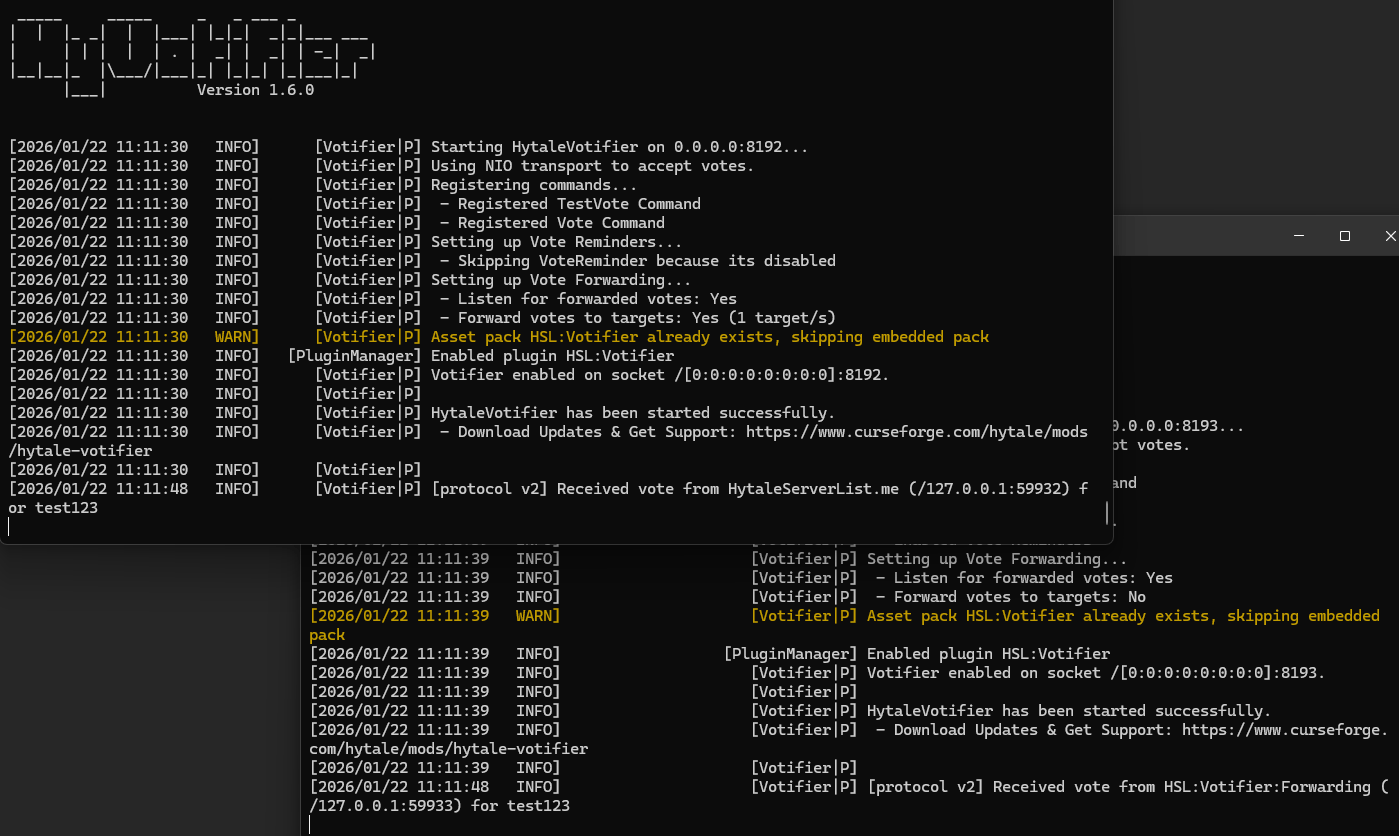
Use the Test Connection button on your HytaleSL server edit page.
- Success: Your Hytale server console will show a vote received from HytaleSL
- Failed: Check the error message and see Troubleshooting below
You can enter a custom test username to verify rewards are working.
Setting Up Hytale Vote Rewards
Configure your Votifier plugin to run commands when votes arrive. Example:
"rewards": [
  {
    "command": "give {player} Diamond 5",
    "chance": 100
  }
]{player}is replaced with the voter’s username- Check your Hytale Votifier plugin’s documentation for exact syntax
Hytale Votifier Troubleshooting
”Could not connect to server”
- Port closed? Ensure port 8192 (TCP) is open in your firewall
- Wrong host? Use your public IP, not
localhostor127.0.0.1 - Server offline? Your Hytale server must be running
”Connection timed out”
- Port may be blocked by your Hytale hosting provider
- Contact your host to open port 8192
”Invalid token” or vote not received
- Token must match exactly (case-sensitive)
- The token key in your Hytale Votifier config must be
HytaleSL - Restart your server after config changes
Player didn’t receive vote rewards
- Was the player online? Some Hytale Votifier plugins queue rewards for offline players
- Username must match exactly (case-sensitive)
- Check server console for errors
Hytale Vote Forwarding (Networks)
Running multiple Hytale servers? Configure vote forwarding in your Votifier plugin so one vote rewards players across all servers. See your plugin’s documentation for setup.
Need Help with Hytale Votifier?
- Use the Test Connection button on HytaleSL to diagnose issues
- Check your Hytale Votifier plugin’s documentation
- Make sure port 8192 is accessible from the internet
Ready to get more votes? Your Hytale server is now set up to reward players who vote on HytaleSL!